BigQueryでGA4/Firebaseのログを使って機械学習
概要
Firebase公開データでユーザー継続予測を行う手順(BigQuery + BQML)
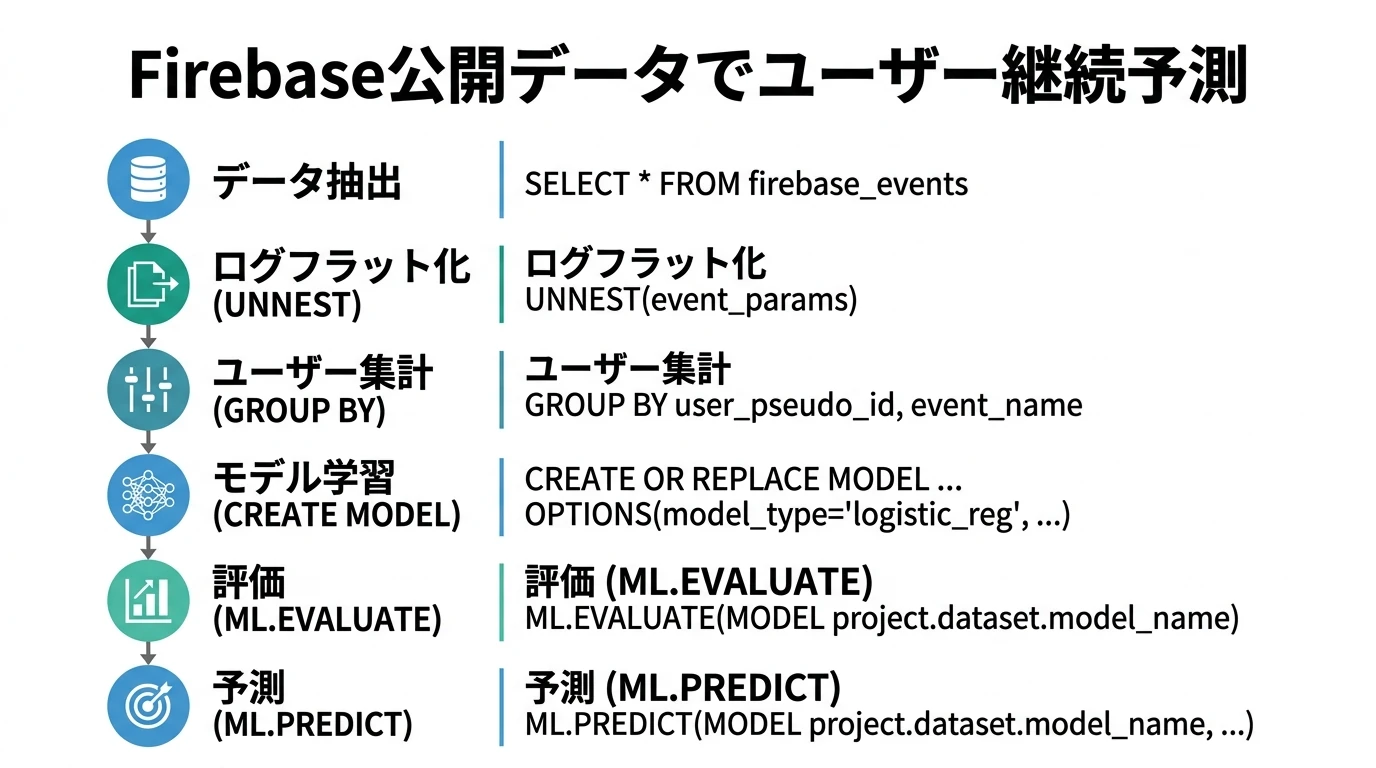
Firebase Analyticsの公開データを使用して、ユーザーの1か月後継続を予測するための一連の分析手順である。生ログのフラット化から機械学習モデルの構築まで、BigQueryとBQMLだけで完結する手法を示す。
使うデータセット
Firebaseのパブリックデータがfirebase-public-project.analytics_153293282.events_*にあるのでこれを使う。
20180612~20181003の114日分のデータ
基本集計(EDA)
データの全体像を把握するため、まずイベントの発生傾向を確認する。どのようなユーザー行動が記録されているかを理解することで、後続の特徴量設計や分析方針の決定に活用できる。
イベントの数の種類別カウント
アプリ内で発生している各イベントの頻度を集計する。これにより、主要なユーザー行動パターンを把握し、重要度の高いイベントを特定できる。
select
  event_name,
  count(0)
from `firebase-public-project.analytics_153293282.events_20181003`
group by 1
order by 2 desc;
スクリーンビューのスクリーン別カウント
ユーザーがアプリ内のどの画面をよく閲覧しているかを分析する。firebase_screen_classパラメータはevent_params配列内にネストされているため、UNNEST()で展開してから抽出する必要がある。
select
  (select ep.value.string_value from unnest(event_params) ep where ep.key = 'firebase_screen_class'),
  count(0) screen_views
from `firebase-public-project.analytics_153293282.events_20181003`
where event_name = 'screen_view'
group by 1
order by 1;
ユーザ別イベント数カウント
ユーザーごとの行動パターンを把握するため、行がユーザー、列がイベント名となるピボットテーブルを作成する。
イベント名はアプリケーションによって動的に変わるため、固定の列定義では対応できない。そこでBigQuery Scriptingを使用して、データに存在するイベント名を自動検出し、動的にピボット用のSQL文を生成する。
declare event_pivot_columns string;
set event_pivot_columns = (
select string_agg(distinct 'sum(case when event_name = "' || event_name || '" then 1 else 0 end) ' || event_name) from `firebase-public-project.analytics_153293282.events_*`
);

execute immediate format("""
create or replace table `my-project.test.user_stats` as
select
  user_pseudo_id,
  min(timestamp_micros(event_timestamp)) first_open_timestamp,
  max(timestamp_micros(event_timestamp)) last_open_timestamp,
  count(0) total_events,
  max(user_ltv.revenue) total_revenue,
  %s
from `firebase-public-project.analytics_153293282.events_*`
group by 1
order by 4 desc;
""", event_pivot_columns)
対象データを抽出してフラット化
Firebase/GA4のイベントデータは、event_paramsやuser_propertiesがネスト構造(配列・構造体)になっている。このままでは集計や機械学習での利用が困難なため、各パラメータを個別の列として展開する。
1行は1イベントで、生ログからイベントパラメータやユーザープロパティをフラット化(UNNEST())し、列にする。パラメータやプロパティは動的なのでBigQuery Scriptingを使う。
まず各パラメータの型を自動判定する。同じキーでもstring_value、int_value、float_valueなど複数の型で値が格納されている場合があるため、データ全体をスキャンして最適な型を決定し、適切にキャストする。
declare ep_columns string;
declare up_columns string;

set ep_columns = (
with t1 as (
  select
    p.key key,
    sum(case when p.value.string_value is not null then 1 else 0 end) cnt_string,
    sum(case when p.value.float_value is not null or p.value.double_value is not null then 1 else 0 end) cnt_float64,
    sum(case when p.value.int_value is not null then 1 else 0 end) cnt_int64
  from `firebase-public-project.analytics_153293282.events_*`, unnest(event_params) p
  group by 1
), t2 as (
  select
    key,
    case
      when cnt_string > 0 then 'string'
      when cnt_float64 > 0 and cnt_int64 > 0 then 'numeric'
      when cnt_float64 > 0 then 'float64'
      when cnt_int64 > 0 then 'int64'
      else 'string'
    end type
  from t1
)
select
string_agg(
  '(select case when p.key = "'
  || key
  || '" then case when p.value.string_value is not null then safe_cast(p.value.string_value as '
  || type
  || ') when p.value.int_value is not null then safe_cast(p.value.int_value as '
  || type
  || ') when p.value.float_value is not null then safe_cast(p.value.float_value as '
  || type
  || ') when p.value.double_value is not null then safe_cast(p.value.double_value as '
  || type
  || ') else null end else null end from unnest(event_params) p where p.key = "'
  || key
  || '") e_'
  || key
  order by key
)
from t2
);

set up_columns = (
with t1 as (
  select
    p.key key,
    sum(case when p.value.string_value is not null then 1 else 0 end) cnt_string,
    sum(case when p.value.float_value is not null or p.value.double_value is not null then 1 else 0 end) cnt_float64,
    sum(case when p.value.int_value is not null then 1 else 0 end) cnt_int64
  from `firebase-public-project.analytics_153293282.events_*`, unnest(user_properties) p
  group by 1
), t2 as(
  select
    key,
    case
      when cnt_string > 0 then 'string'
      when cnt_float64 > 0 and cnt_int64 > 0 then 'numeric'
      when cnt_float64 > 0 then 'float64'
      when cnt_int64 > 0 then 'int64'
      else 'string'
    end type
  from t1
)
select
string_agg(
  '(select case when p.key = "'
  || key
  || '" then case when p.value.string_value is not null then safe_cast(p.value.string_value as '
  || type
  || ') when p.value.int_value is not null then safe_cast(p.value.int_value as '
  || type
  || ') when p.value.float_value is not null then safe_cast(p.value.float_value as '
  || type
  || ') when p.value.double_value is not null then safe_cast(p.value.double_value as '
  || type
  || ') else null end else null end from unnest(user_properties) p where p.key = "'
  || key
  || '") u_'
  || key
  order by key
)
from t2
);

execute immediate format("""
create or replace table `my-project.test.log_filtered` partition by date(event_timestamp) as
with t1 as (
  select
    user_pseudo_id,
    min(timestamp_micros(event_timestamp)) over(partition by user_pseudo_id) first_open_timestamp,
    timestamp_micros(event_timestamp) event_timestamp,
    event_name,
    %s, %s,
    device.category device_category,
    device.operating_system,
    device.operating_system_version,
    case when device.browser is not null then device.browser else device.web_info.browser end browser,
    case when device.browser_version is not null then device.browser_version else device.web_info.browser_version end browser_version,
    platform,
    app_info.install_source
  from `firebase-public-project.analytics_153293282.events_*`
  where user_pseudo_id in (select distinct user_pseudo_id from `firebase-public-project.analytics_153293282.events_*` where event_name = 'first_open')
), t2 as (
  select *, timestamp_diff(event_timestamp, first_open_timestamp, second) seconds_since_first_open from t1
)
select * from t2
""", ep_columns, up_columns);
機械学習用データセットを作る
ユーザーの1か月後継続を予測するための機械学習用データセットを作成する。
継続の定義として、利用開始から29日目~35日目にスクリーンビューがあれば継続とみなす。予測に使用する特徴量は、利用開始から7日間のアクティビティに基づいて集計する。
1行1ユーザで、利用開始から7日間のアクティビティを集計(イベント名やスクリーンクラス別カウント、エンゲージメント時間など)。特徴量化するイベントやスクリーンクラスは出現頻度1%以上に絞り込む。
-- screen_classごとのスクリーンビュー数
declare screen_class_columns string;
declare event_name_columns string;

create temp table screen_classes as
with t1 as (
  select
    e_firebase_screen_class, count(0) cnt
  from `my-project.test.log_filtered`
  where event_name = 'screen_view'
  group by 1
  order by 1
)
select *, cnt/sum(cnt) over() ratio from t1 order by 2 desc
;

-- 出現頻度が1%より大きいものをカウント対象にする
set screen_class_columns = (select
string_agg('sum(case when e_firebase_screen_class = "' || e_firebase_screen_class || '" and event_name = "screen_view" then 1 else 0 end) screen_views_' || e_firebase_screen_class)
from screen_classes where ratio > 0.01
);

-- event_nameごとのイベント数
create temp table event_names as
with t1 as (
  select
    event_name, count(0) cnt
  from `my-project.test.log_filtered`
  where event_name not in ('screen_view', 'user_engagement', 'first_open')
  group by 1
  order by 1
)
select *, cnt/sum(cnt) over() ratio from t1 order by 2 desc
;

-- 出現頻度が1%より大きいものをカウント対象にする
set event_name_columns = (select
string_agg('sum(case when event_name = "' || event_name || '" then 1 else 0 end) event_count_' || event_name)
from event_names where ratio > 0.01
);

execute immediate format("""
create or replace table `my-project.test.sum_by_user` as
with t1 as (
  select
    user_pseudo_id,
    min(extract(dayofweek from first_open_timestamp)) first_open_dow,
    min(platform) platform,
    min(install_source) install_source,
    sum(case when seconds_since_first_open <= 1*24*60*60 and event_name = 'screen_view' then 1 else 0 end) screen_views_first_1d,
    sum(case when seconds_since_first_open <= 1*24*60*60 and e_engagement_time_msec is not null then e_engagement_time_msec else 0 end)/1000 engagement_time_seconds_first_1d,
    sum(case when event_name = 'screen_view' then 1 else 0 end) screen_views,
    sum(case when e_engagement_time_msec is not null then e_engagement_time_msec else 0 end)/1000 engagement_time_seconds,
    %s, %s
  from `my-project.test.log_filtered`
  where seconds_since_first_open <= 7*24*60*60
  group by 1
), t2 as (
  select
    user_pseudo_id,
    sum(case when event_name = 'screen_view' then 1 else 0 end) screen_views_29d_35d
  from `my-project.test.log_filtered`
  where seconds_since_first_open > 28*24*60*60 and seconds_since_first_open <= 35*24*60*60
  group by 1
), t3 as (
  select
    t1.*,
    ifnull(screen_views_29d_35d, 0) screen_views_29d_35d,
    rand() rnd
  from t1 left join t2 using(user_pseudo_id)
), t4 as (
  select
    * except(screen_views_29d_35d, rnd),
    screen_views_29d_35d > 0 active_after_4w,
    case
      when rnd < 0.8 then 'TRAIN'
      when rnd < 0.9 then 'EVALUATE'
      else 'TEST'
    end subset
  from t3
)
select * from t4
""", screen_class_columns, event_name_columns);
BQML
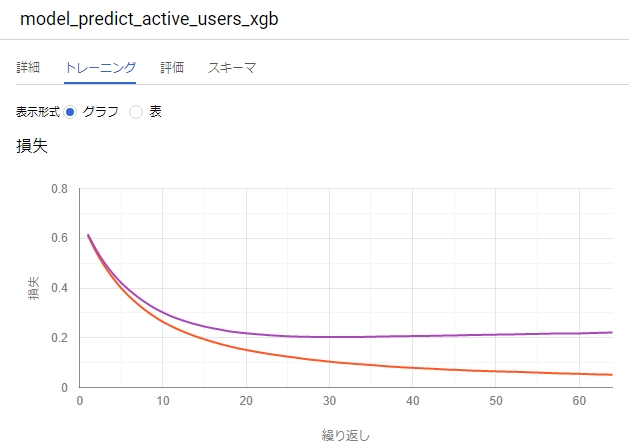
BigQuery MLを使用して、ユーザーの継続を予測するモデルを構築する。ここでは勾配ブースティング木(XGBoost相当)を使用し、学習・評価・予測の3ステップで実行する。
学習
学習用データ(TRAIN)を使用してモデルを構築する。active_after_4wを目的変数として、その他の特徴量から継続の有無を予測する分類モデルを作成する。
CREATE OR REPLACE MODEL `my-project.test.model_predict_active_users_xgb`
OPTIONS(
  MODEL_TYPE='BOOSTED_TREE_CLASSIFIER',
  NUM_BOOSTED_TREES=100,
  MAX_TREE_DEPTH=6,
  SUBSAMPLE=0.8,
  INPUT_LABEL_COLS=['active_after_4w']
) AS
select * except(user_pseudo_id, subset)
from `my-project.test.sum_by_user`
where subset = 'TRAIN';
評価
評価用データ(EVALUATE)を使用してモデルの性能を確認する。精度、適合率、再現率、AUCなどの指標が出力される。
SELECT * FROM ML.EVALUATE(MODEL `my-project.test.model_predict_active_users_xgb`, (
  select * except(user_pseudo_id, subset)
  from `my-project.test.sum_by_user`
  where subset = 'EVALUATE'
));
予測
テスト用データ(TEST)に対して予測を実行する。各ユーザーが継続する確率を算出し、確率の高い順に並べることで、リテンション施策の優先順位付けに活用できる。
with predictions as (
  SELECT * FROM ML.PREDICT(MODEL `my-project.test.model_predict_active_users_xgb`, (
    select * except(subset)
    from `my-project.test.sum_by_user`
    where subset = 'TEST'
  ))
)
select
  user_pseudo_id,
  active_after_4w,
  (select p.prob from unnest(predicted_active_after_4w_probs) p where p.label = true) prob
from predictions
order by prob desc;